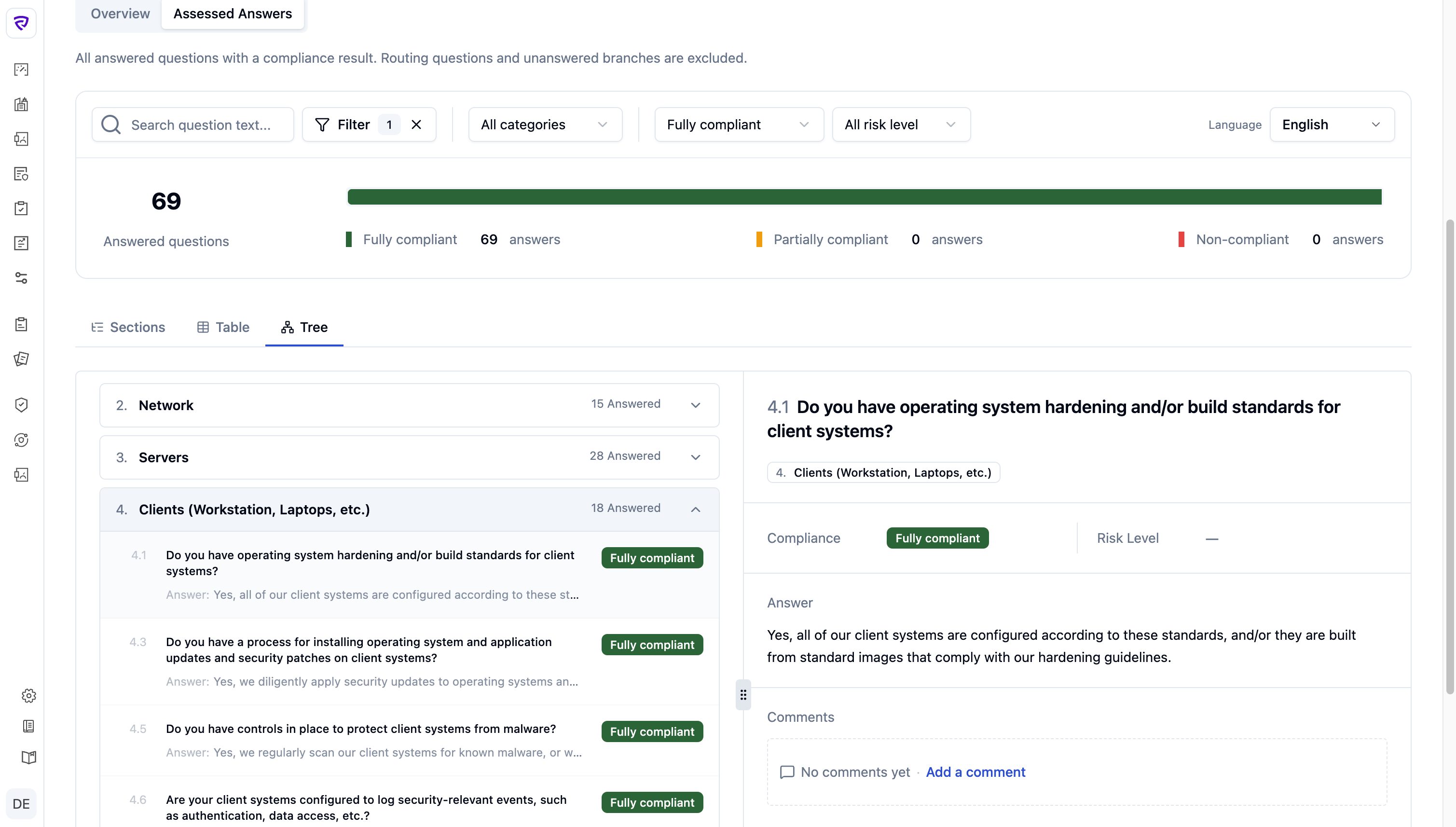
Audit Review Workspace — Tree view with framework hierarchy on the left and the question detail slideout open on the right

From a flat list of 200+ control answers to three views, one source of truth

The legacy review UI turned every audit into a manual, high-friction process — scroll, hunt for evidence, rebuild context. Reviews took longer, approvals stalled, and consistent judgments became harder as frameworks scaled.

Role
Product Designer · Design Engineer
Timeline
2 weeks · 2026
Team
Solo design + build · backend on demand
Scope
Web · B2B SaaS · Cybersecurity
Before
  • Flat, form-like interface
  • Lost framework context
  • Tab-switching to find evidence
After
  • Three synced views: Sections / Table / Tree
  • Shared slideout for evidence
  • Inline comments + risk decisions
Status
  • Shipped to production, May 2026
  • Replaced legacy audit UI — no fallback
  • Validated in pre-launch walkthrough with the audit lead
  • Designed and vibe-coded in Vue + Tailwind + shadcn-vue

Auditors think in frameworks. The product gave them a form.

The legacy audit UI turned review into a manual, high-friction process. Instead of helping auditors quickly identify risk, validate evidence, and make consistent decisions, it increased review time, slowed approvals, reduced scalability across complex frameworks, and lowered confidence in the audit outcome.
What wasn't working
01
Flat lists hide structure
  • No rolled-up category state
  • No jump-to-branch
  • Auditors lost their place
02
Evidence was two clicks away
  • Documents lived in a separate tab
  • Verifying meant leaving the question
  • Hunting attachments by hand
03
Risk reviewed at the wrong altitude
  • Decisions per question, reports per framework
  • No way to see judgments rolled up
04
Bulk imports had no guardrails
  • Vendors returned XLSX in any shape
  • Errors surfaced only after import
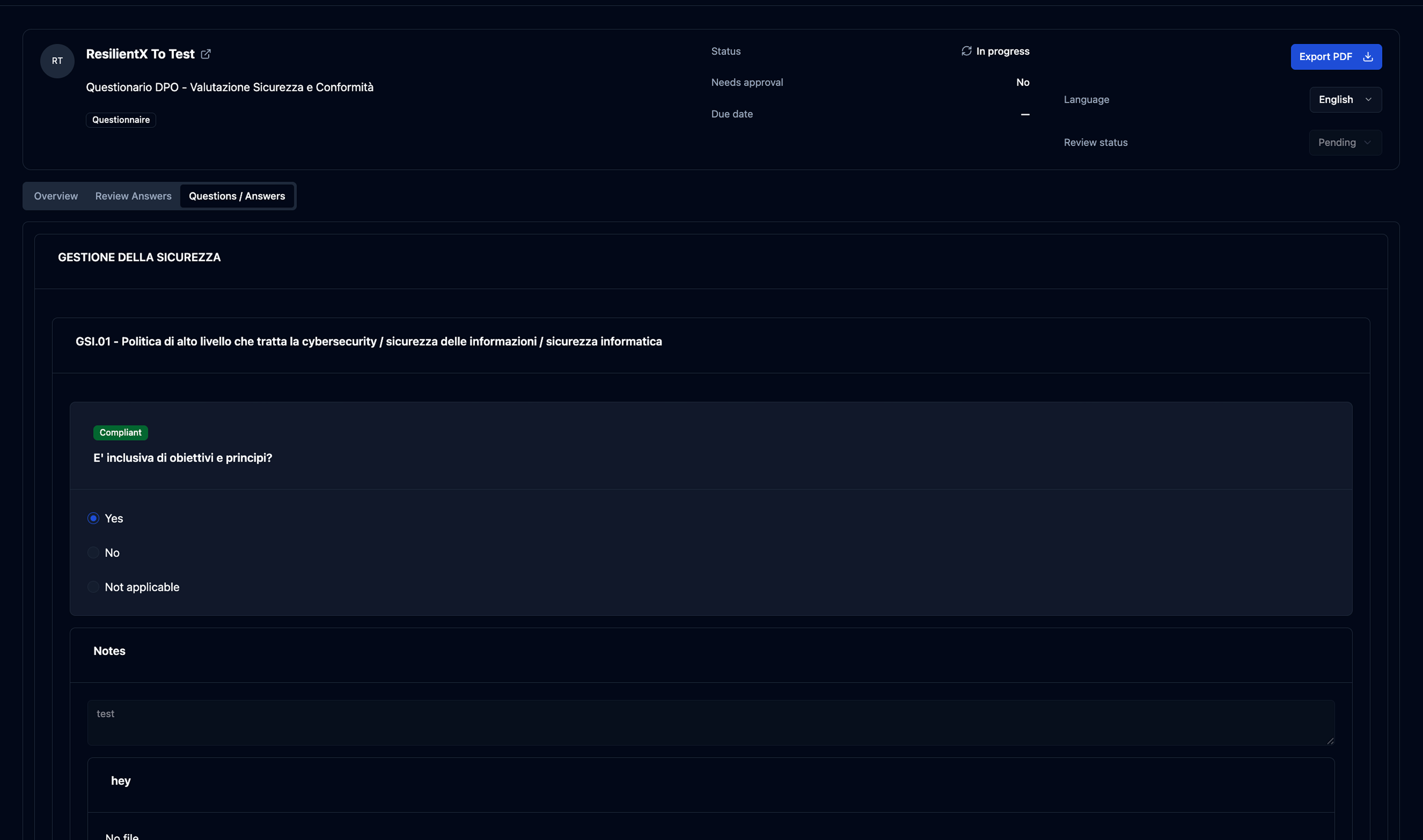
Legacy audit review UI — a flat scroll of question/answer cards with evidence in a separate tab and no rolled-up framework state
The legacy review — one long form, no framework hierarchy, evidence one tab away.

A complexity-reduction problem, not a research-heavy one

The hardest part: translating a recursive, schema-heavy questionnaire into a clear, fast review workflow.

Shaped by stakeholder feedback, product constraints, and analysis of the questionnaire model — not a formal research program.

01 — Key Insight
A flat list erases the framework
Source: Walk-through of the legacy flow
Design Decision
Make the framework hierarchy the primary navigation
A left-side category tree with rolled-up status keeps the framework visible — every branch one click away.
02 — Key Insight
Evidence belongs next to the answer it proves
Source: Internal stakeholder feedback
Design Decision
Pull evidence, comments, and risk into a single side-out
Auditors called the legacy flow “tab tennis.” One slideout holds the answer, evidence, comments, and risk decision — the reviewer never leaves the question.
03 — Key Insight
Per-question decisions need a framework-level lens
Source: Schema analysis · design review
Design Decision
Roll compliance status up the tree
Each category carries a compliance badge derived from its leaves — full, partial, or non-compliant. Judgments scale to control areas without a context switch.
04 — Key Insight
Vendor answer imports need structure, not just acceptance
Source: Internal review of the legacy import path
Design Decision
Gate the import behind a guided XLSX template
Vendors download a pre-filled XLSX, fill it offline, and re-upload. Validation runs before the audit is touched — errors surface in the wizard, not the report.

Same data, three shapes — let the reviewer pick

Instead of forcing one layout, I designed three complementary views over the same audit data: Sections for chapter-level review, Table for triage, Tree for structural inspection.

The mental shift

The hardest part wasn’t picking a layout — it was the mental shift. Stop asking “how do I show the questionnaire?” Start asking “how do I help a reviewer understand it?”

Once that flipped, Table became review-first, Tree became structure-first.

View 01
Sections
  • Categories rolled up to compliance
  • Answered count + click-to-expand
  • Default landing — reviewers’ mental model
View 02
Table
  • Answers “what needs attention now”
  • Same questions, flat
  • Sortable by compliance and risk
View 03
Tree
  • Nested controls (HIPAA, ISO 27001, NIS2)
  • Graph with status at every node
  • Orientation when control is unknown
Process — exploring hierarchy treatments

Four ways to render a deep framework — one survived

ISO 27001 nests four levels deep. Before settling the table treatment, I used AI tooling (Figma Make) to prototype four hierarchy approaches and compare side-by-side.

Chosen

Nested banners

01 / 04

Each level gets a visual anchor without indentation eating the answer column. Hierarchy stays scannable, rows stay readable.
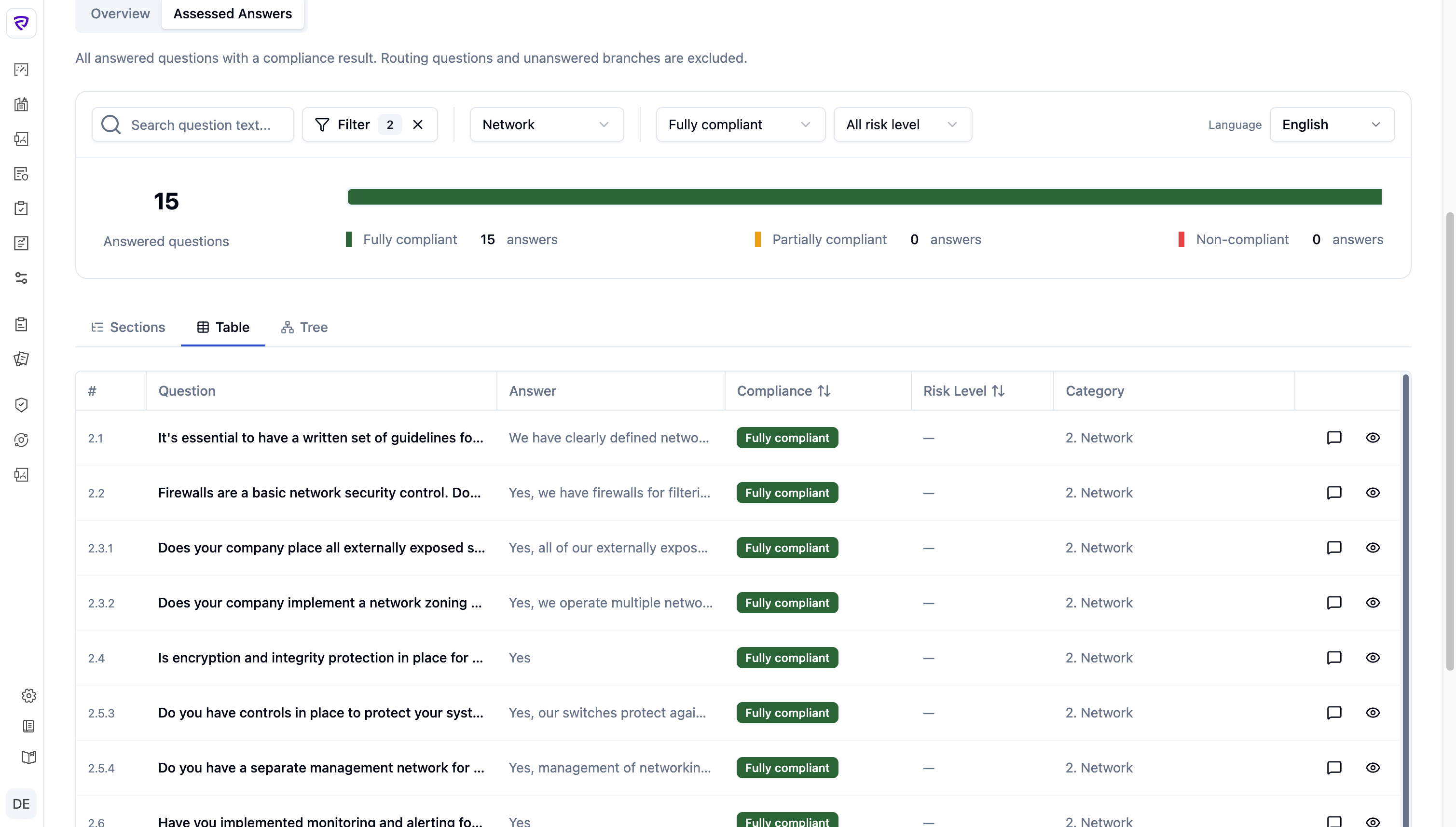
Nested banners variant

Three jobs. Why, where, and what.

The audit experience is a journey: understand the state, locate the problems, take the next action. Splitting the work this way let each page (and each row) hold only what its job demanded.

Audit experience
Layer 01
Why
Overview snapshot
Are we compliant?
Is the audit on track?
What’s missing?
Where are the worst areas?
Layer 02
Where
Q/A — locate the problem
Which questions are non-compliant?
Which are high-risk?
What’s still unanswered?
Which categories are weakest?
Layer 03
What
Q/A — act on the row
Open the answer + evidence
Comment for the team
Flag for follow-up
Mark for remediation

Three views over one normalized model, plus a slideout for judging

The Audit Review Workspace ships as three view modes — Sections, Table, Tree — plus a slideout that opens from any view. Vibe-coded in the terminal — Vue 3 + Tailwind on shadcn-vue — and instrumented with Clarity and Hotjar.

A naming decision that did real work

“Assessed Answers,” not “Questions / Answers”

Renaming the tab from “Questions / Answers” to Assessed Answers narrowed scope to answered questions with a compliance result. The metrics, filters, and row design all flow from that constraint.

01 — Sections view

The framework as a structured table of contents

For reviewers who think in framework chapters. Compliance rolls up to the category, so the framework stays scannable before the auditor drills in.
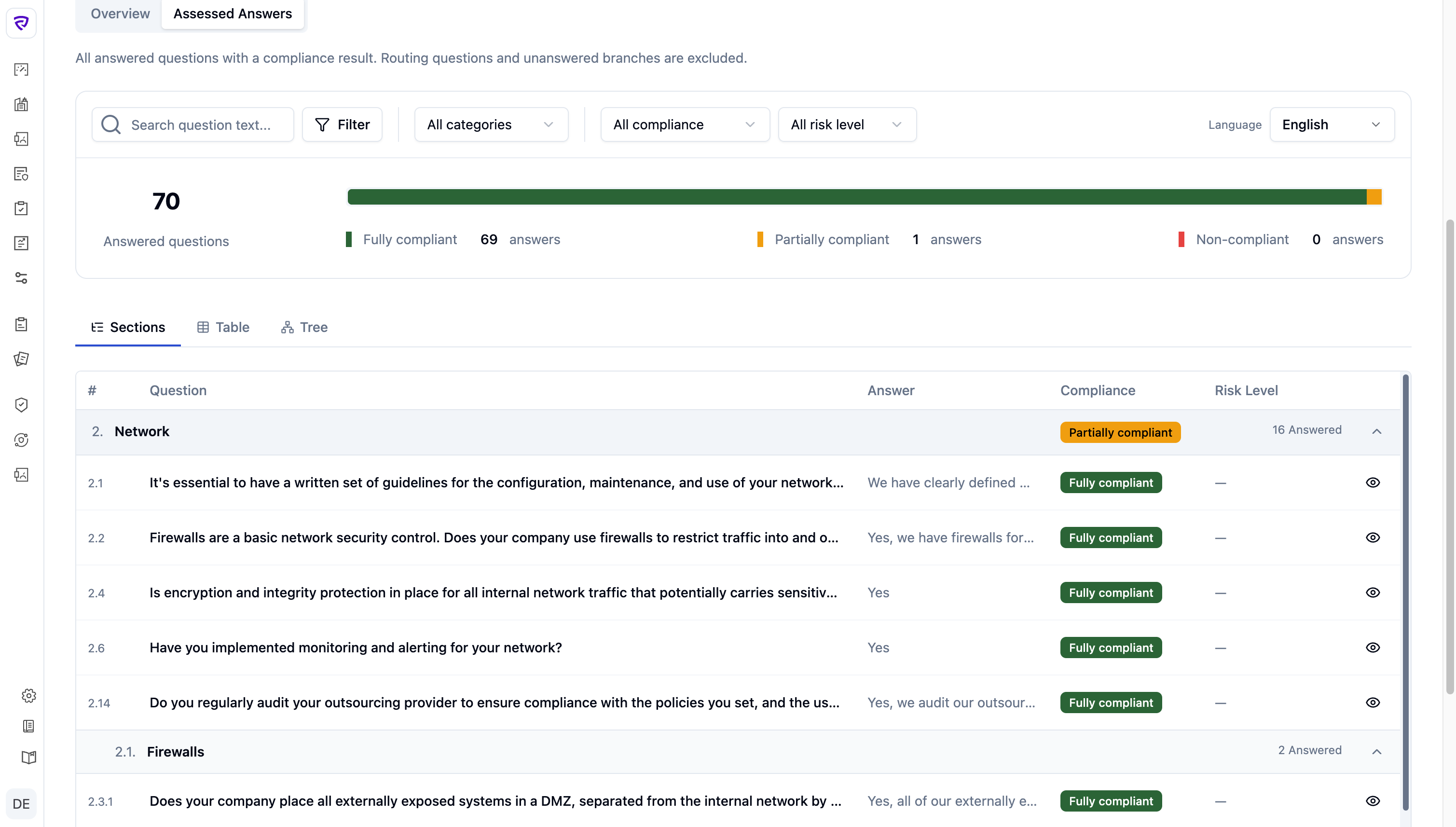
Audit Center — Sections view of the HIPAA Security Questionnaire with compliance progress bar and category rows
02 — Table view

Flat triage when risk doesn’t care about hierarchy

For triage. Same questions, flat — sortable by compliance and risk to surface what needs attention without fighting the structure.

Audit Center — Table view: flat triage with compliance and risk columns, sortable rows
03 — Tree view

The framework as a graph, status at every node

For deep frameworks (HIPAA, ISO 27001, NIS2). The tree shows the actual shape — sub-sections, controls, conditional branches — with status rolled up at every node.

Audit Center — Tree view: framework hierarchy with status rolled up at every node and the question slideout open
04 — The slideout (shared)

Where the actual judgment happens

A judgment isn’t the answer alone — it’s the answer plus evidence plus prior comments. The slideout brings those together with a risk badge and opens identically from Sections, Table, or Tree.
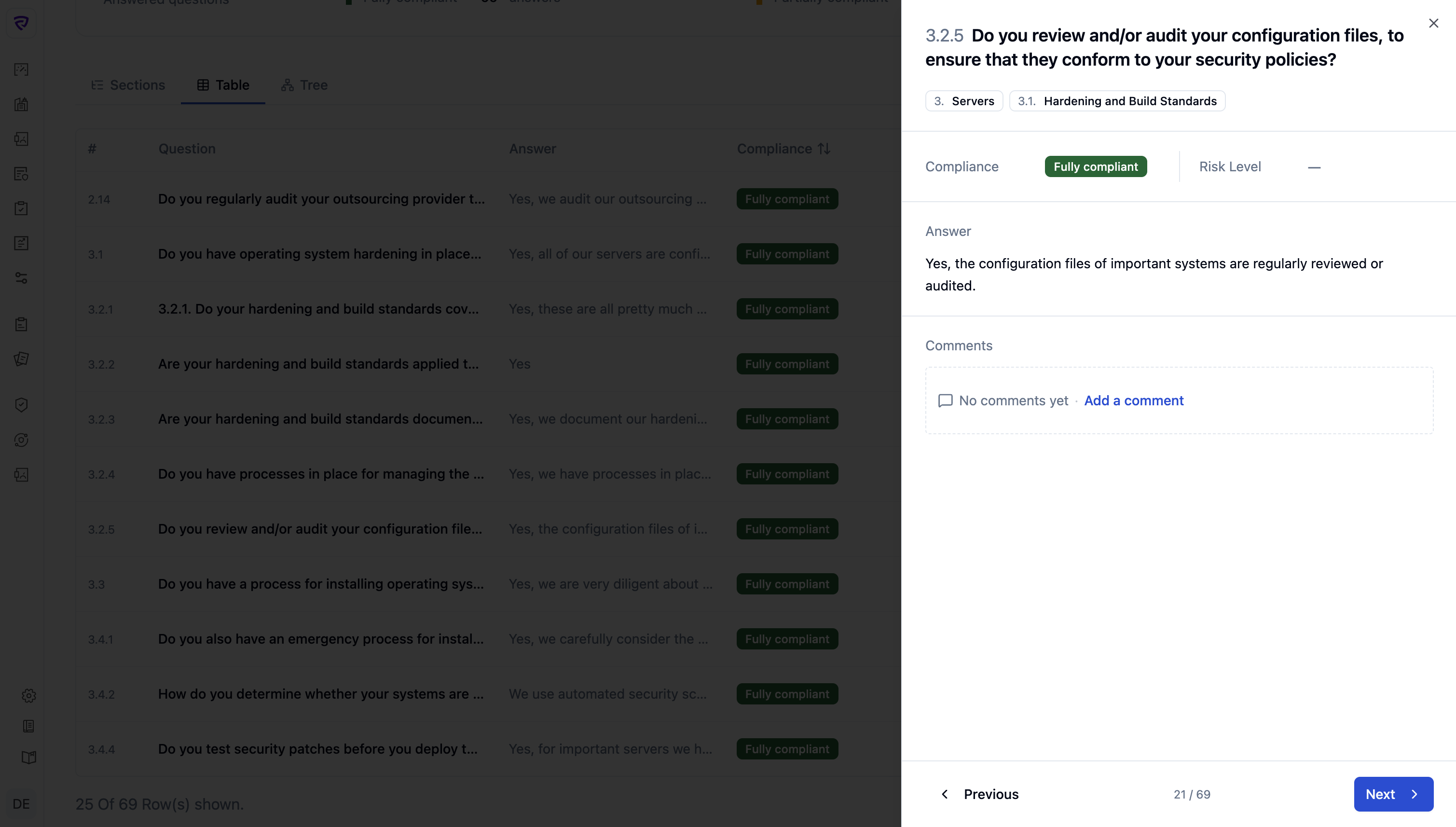
Audit Center — slideout panel showing question 3.2.5 with category tags, compliance, risk, answer, and comments; previous/next navigation at the foot

Tested with a colleague — and fixed the rough edges before production

I ran a usability session with a colleague who works inside the audit flow daily. The session surfaced friction I hadn’t anticipated; I iterated and shipped.

Design + ship in code, with the people who run real audits

Solo design with eng support on the data layer — closer to a one-person feature team than a handoff pipeline.

Build
Designed + vibe-coded the whole redesign

Built the three views and the slideout directly in Vue + Tailwind + shadcn-vue, vibe-coding from the terminal. No Figma-to-eng handoff, no spec doc — production code was the source of truth from day one. Figma Make stayed as a thinking surface for the four-variant hierarchy exploration (above) before committing.

Validate
Pre-launch walkthrough with the audit lead

Sat with the person running real reviews daily. Friction I hadn’t anticipated surfaced in the session; iterated and shipped before the legacy UI was retired.

Pair
Backend on demand · founder check-ins

No dedicated backend pairing — eng pulled in when the data shape needed changes. The “Assessed Answers” naming decision (above) came out of one of those conversations with the founders.

Shipped to production — adopted by the review team on day one

The new audit experience replaced the legacy view in production in May 2026. Customer usage data is still accumulating, so this section reports what I can stand behind today: internal validation from the people running real reviews, the design decisions that proved themselves under scrutiny, and the metrics I’ve instrumented for the 30/60-day readout.

Internal validation
Positive reception from analysts, risk managers, and leadership
  • “Feels lighter” than the legacy flow
  • Non-compliant answers surfaced without hunting
  • Used in live reviews from week one — no fallback to the old UI
Decision shape working
Reviewers land in Sections, switch to Table for triage
  • Sections is the default entry — matches the framework mental model
  • Table is pulled up to surface non-compliant / high-risk rows
  • The three-view structure is doing the job it was designed for
Open challenges
What I’m still working through
  • KPI strip competing visually with the workspace
  • Info / warning / tip nodes need clearer separation from questions
  • So context nodes aren’t mistaken for items to judge
What I’ve instrumented — 30/60-day readout

Clarity and Hotjar are running on the new views. The questions I’m answering with the first cohort:

  • Does time-to-decision drop as reviewers settle in?
  • Do reviewers open evidence before setting risk — or override without it?
  • How does view usage split — Sections vs. Table vs. Tree — and by persona?
  • Where does the slideout show up in the review path, and how often?
What I learned

When a product is built on a flexible technical schema, the best design move is often not to expose that flexibility directly — it’s to reinterpret it for the user’s task.

The task here wasn’t “fill in a questionnaire” or “manage a schema.” It was: understand outcomes, review answers, identify issues, act. Every decision — three views, slideout, “Assessed Answers” — flowed from that.

More Case Studies