Bulk CSV import flow Add single supplier

Onboarding was the entry point to everything — and the biggest bottleneck

Designing a scalable supplier onboarding system for enterprise TPRM, transforming a manual process into a high-volume, data-controlled workflow.

Role
Product Designer
Timeline
6 weeks · 2025–2026
Team
Solo design · Eng team
Scope
Web · B2B SaaS · Cybersecurity
Toolkit
Figma · Figma Make · shadcn-vue
Before
  • Long form, one supplier at a time
  • Teams ran spreadsheets instead
  • Backend imports as workaround
After
  • Simplified single-supplier flow
  • Controlled bulk CSV import
  • Field mapping + validation
Impact
  • 36 sec (from 3–4 min)
  • Bulk import enabled
  • 0% rage clicks across 20+ sessions

A process built for one supplier — a product that needed hundreds.

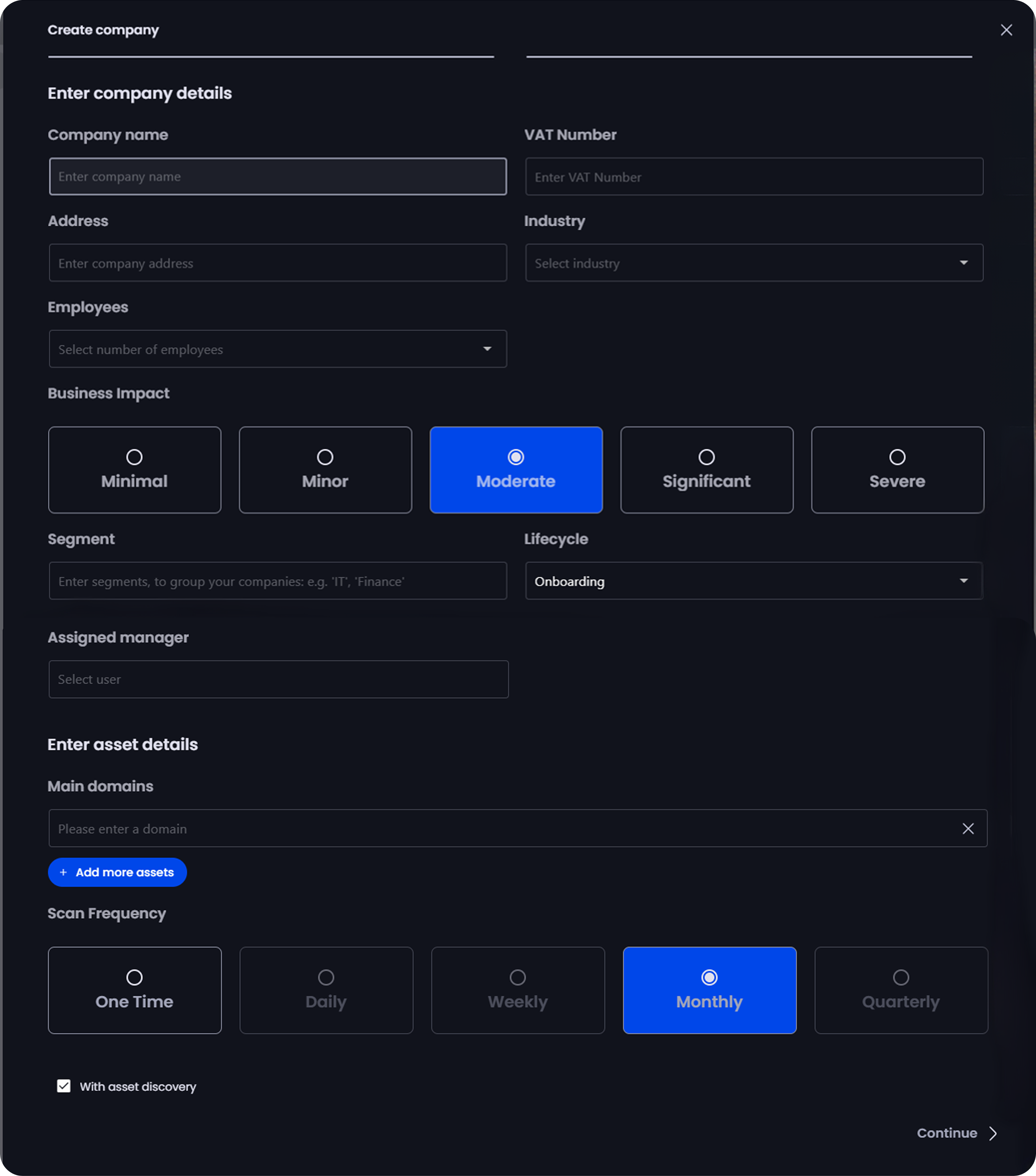
Supplier onboarding is the entry point to all TPRM workflows — compliance, audits, and risk monitoring. Yet the experience was designed as a linear, single-entry flow: one supplier, one form, 15+ fields, manually completed every time.

At ~3 minutes per supplier, enterprise teams managing 50–500 vendors were spending entire workdays on repetitive data entry. As volume increased, the system failed to support real workflows — teams began bypassing the product entirely, relying on offline spreadsheets and backend workarounds to complete onboarding.

The result: the product's core entry point was no longer usable at scale, creating operational bottlenecks, fragmented workflows, and reduced trust in downstream data.
What wasn't working
01
Manual entry doesn't scale
  • 3–4 minutes per supplier
  • Scrolling and hesitating on the form
  • No clear hierarchy
02
The system was bypassed entirely
  • No bulk onboarding existed
  • Teams ran spreadsheets instead
  • Backend imports as workaround
03
Unclear structure increased cognitive load
  • Required vs optional not distinguished
  • Hesitation and incomplete entries
  • Repeated corrections
04
Data issues propagated downstream
  • Bad data flowed into compliance + audit
  • Reduced trust in risk assessments
Original manual onboarding form

The original form — one-by-one entry, no field hierarchy, no bulk support.

Why users abandoned the onboarding flow

Observing user behavior and gathering input from sales revealed two connected failures: the flow was too slow for scale, and too loose for accuracy.

01 — Key Insight
The form exposed too much, too early
Source: Session recordings (Clarity)
Design Decision
Introduce progressive disclosure, starting with supplier identity
Users were immediately presented with all fields, increasing cognitive load and hesitation. The flow now begins with a single input, guiding users step by step.
02 — Key Insight
Speed without accuracy creates downstream risk
Source: Session recordings · incorrect entries observed
Design Decision
Validate data at the point of entry
Incorrect supplier names and domains were common. Validation is now embedded throughout the flow to ensure data quality without slowing users down.
03 — Key Insight
Enterprise workflows already existed outside the product
Source: Sales team feedback
Design Decision
Support bulk onboarding through existing data formats
Teams managing hundreds of suppliers were already working in spreadsheets. The product now integrates with this behavior instead of replacing it.
04 — Key Insight
Bulk import without guardrails creates bigger problems than no import at all
Internal discussion · observed errors
Design Decision
Gate imports with validation and required structure
Bulk onboarding is only valuable if data is reliable. The system enforces required fields and surfaces errors before import.

From manual input to a scalable onboarding system

Onboarding was reframed from a single flow into a system that supports both scale and flexibility. Rather than optimizing form completion, the focus shifted to aligning with how teams manage supplier data at different volumes.

A single flow would force a compromise — either too complex for individual use or too rigid for bulk operations. Two complementary modes allow each to be optimized for its context.

Both modes share the same data model and validation logic, ensuring consistency regardless of how suppliers enter the system.

Solution 01
Bulk import
  • For teams already in spreadsheets
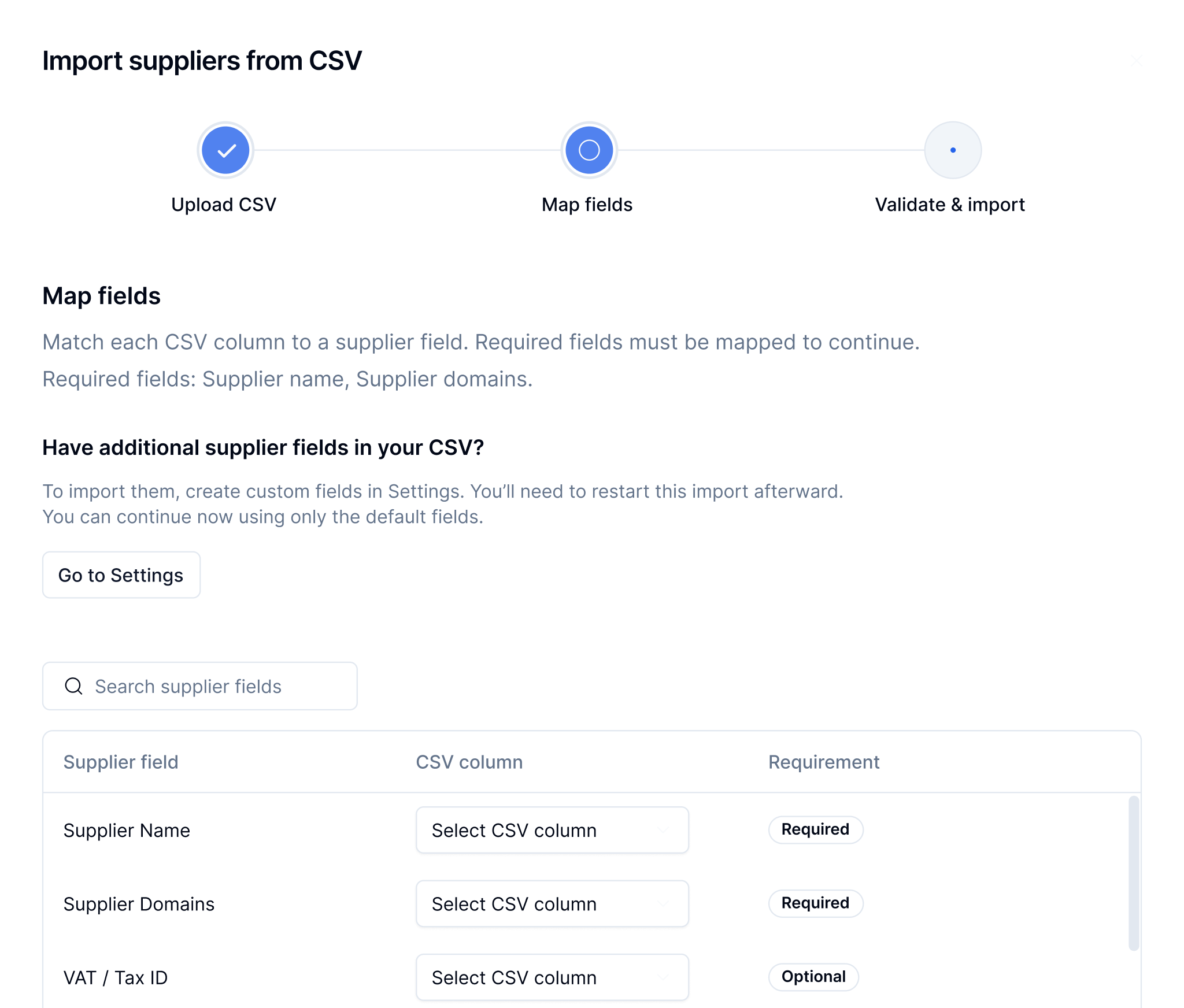
  • Upload CSV, map fields, validate
  • Controlled onboarding at scale
Solution 02
Simplified single-supplier flow
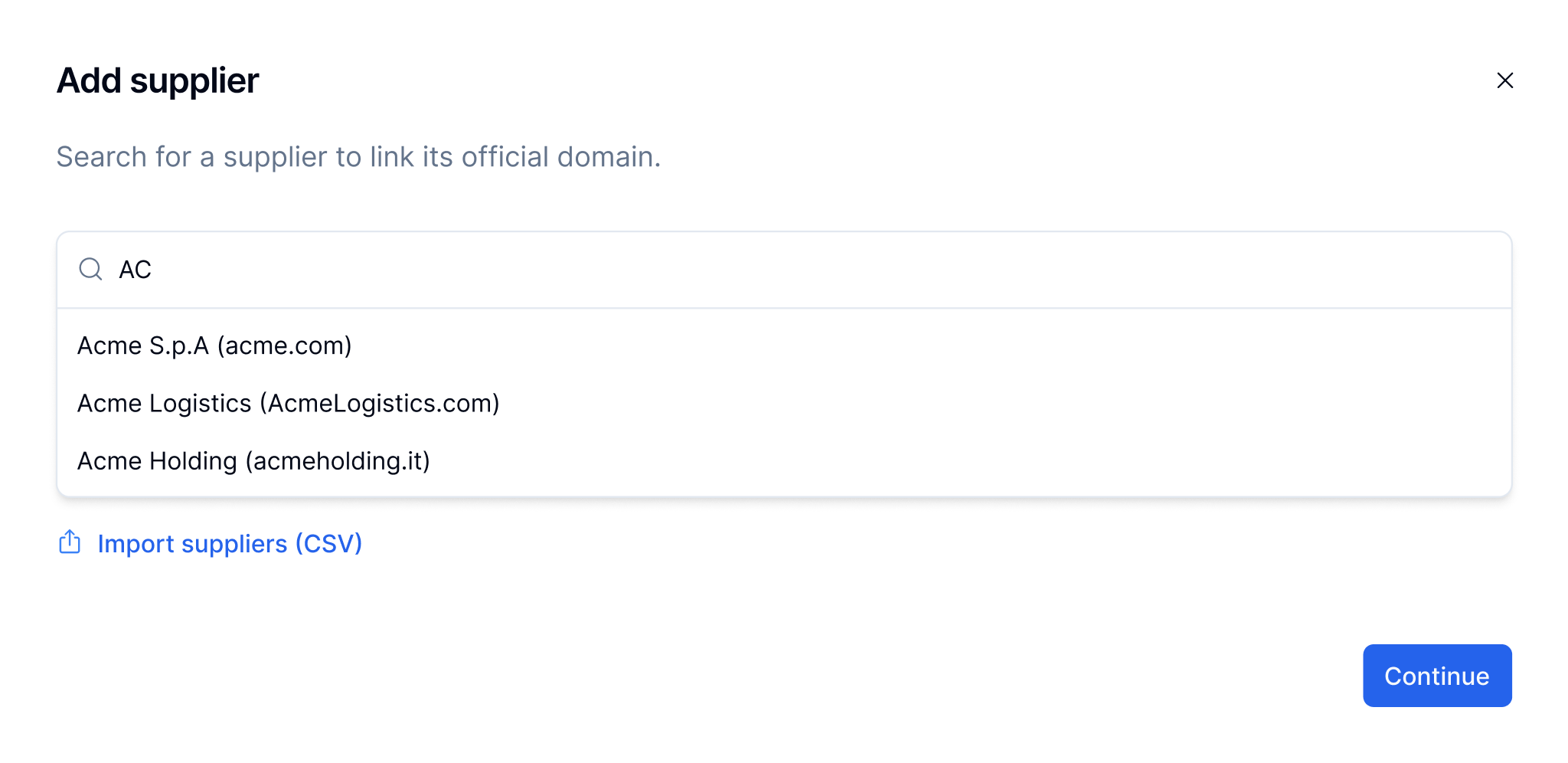
  • Start with a name, get auto-suggestions
  • Domain validated automatically
  • Essential fields only, smart defaults

Bulk import is not just about speed — it is controlled onboarding at scale.

Designing onboarding for speed and data accuracy

To support both high-volume operations and everyday use, onboarding was structured into two complementary entry modes — each optimised for a different context, while sharing the same validation and data logic.

01 — Bulk onboarding

Bulk onboarding with controlled validation

Why

Enterprise teams already managed supplier data in spreadsheets. Importing without structure or validation introduced significant risk.

What changed

A guided import flow lets users upload a CSV, map columns to system fields, and validate entries before submission. Errors are surfaced with clear guidance on how to resolve them.

Impact

Teams can onboard hundreds of suppliers in a single session while maintaining data quality and consistency.

Bulk import flow — CSV upload, column mapping to system fields, and validation step
02 — Guided onboarding

Guided onboarding for individual suppliers

Why

The original form exposed too many fields at once, slowing users down and increasing errors.

What changed

The flow starts with a simple supplier search. If the supplier exists, key data is auto-filled. If not, users continue through a step-by-step flow with prefilled suggestions.

Impact

Reduces input effort, speeds up onboarding, and improves accuracy through progressive validation and smart defaults.

Guided single supplier flow — supplier search, auto-fill, and progressive step validation
03 — Shared foundation

Shared data model and validation logic

Both onboarding modes rely on the same data structure and validation rules. This ensures that regardless of how suppliers are added — individually or in bulk — the data remains consistent and reliable across compliance and audit workflows.

From a bottleneck to a starting point

The redesign shifted onboarding from a manual, single-entry process into a scalable system — eliminating spreadsheet workarounds and backend engineering imports entirely. Teams that previously spent entire workdays on data entry can now onboard hundreds of suppliers in a single session, with structured validation ensuring data accuracy across downstream compliance and audit workflows.

First 30 days post-launch · Early signals only.
36 sec
fastest recorded · down from 3–4 min
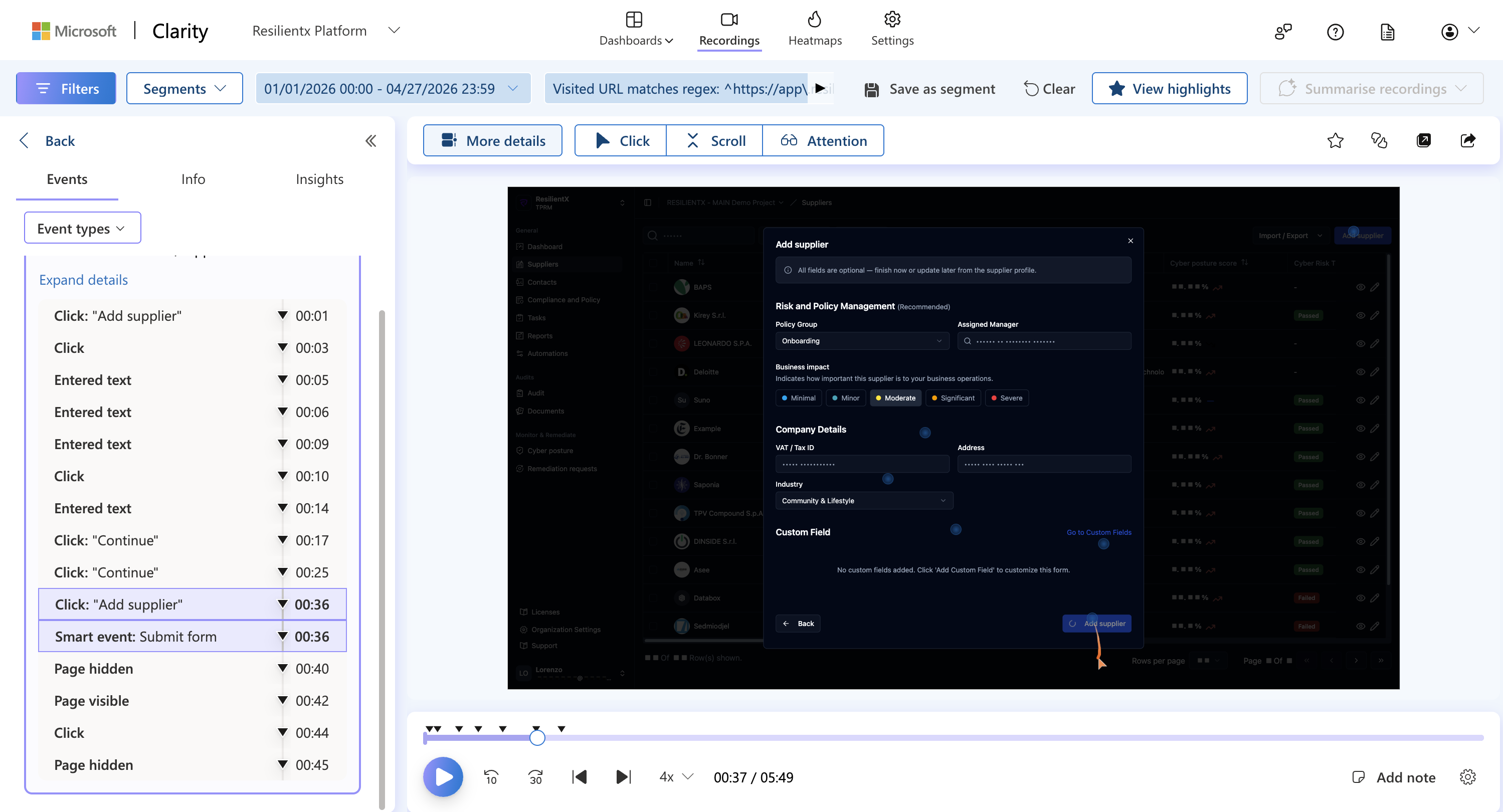
  • 36 sec to complete onboarding
  • Down from 3–4 minutes
  • Verified via Clarity session recordings
bulk import enabled
  • 50–500 suppliers in a single session
  • Workflow that previously didn’t exist
  • One structured path, end to end
Clarity session recording — supplier added in 36 seconds

Clarity · session recording · supplier added in 36 sec · Jan–Apr 2026

20+ post-launch sessions on Hotjar

Speed held — but two patterns re-shaped the v2 roadmap

Rage-click and speed numbers stayed strong. The recordings surfaced two patterns we hadn’t designed for.

A · Surprising preference

Many users kept adding suppliers one-by-one

For most teams, typing a few suppliers felt faster than preparing a CSV. Bulk complemented single-entry; it didn’t replace it.

B · Import still failed for some

A two-loop diagnosis

Loop 1 · Platform (3–4 bugs)
Valid uploads rejected when a supplier already existed, plus 2–3 other validation bugs. Backend patched these.
Loop 2 · User-side
After the fixes, imports still failed: CSVs were missing required fields. Not a platform bug.

My role vs the team’s: I diagnosed both from the recordings. Backend owned Loop 1. Loop 2 wasn’t fixable in code — we agreed it needed a different solution, not another patch.

What we discovered post-launch

Next: AI-assisted CSV correction

Findings independently confirmed by the CTO (Clarity recordings) and the CEO (direct customer conversations). AI-assisted data correction is now in the next sprint — cutting manual error resolution where users get stuck.

What I would track next
CSV import completion rate
% completing bulk onboarding end to end.
Error resolution time
Time spent fixing validation errors.
Return visit rate
Whether onboarding becomes a habitual starting point.
Supplier data quality score
Downstream data errors in compliance workflows.
More Case Studies